30 Mar 🎧 Ready for the decks? Preparation guide for the 10th Festival DJ Party!
Φυσικά\! Ορίστε η μετάφραση του κειμένου στα αγγλικά, διατηρώντας ακριβώς την HTML δομή και όλα τα attributes που μου έδωσες:
\
Hello to all our future Festival DJs\!\</p\> \
The \10th Student Radio Festival\</b\> is approaching and the DJ Party is expected to be the highlight of the event\! Following the seminar we had with \Alexandros\</b\> and \Filippos\</b\>, you are now one step closer to getting on the decks.\</p\>
\
\
📺 Watch the Seminar\</h2\> \
If you missed anything or want to see again how the console works and how we use Rekordbox, watch the video recording here: 👉\</p\> \
\\</p\>
\
\
🎵 First steps of preparation\</h2\> \
Before you start using Rekordbox, you need to do your “research”:\</p\>
\
-
- \<li\> \
\Music Selection:\</b\> Find and download the songs you want to play. Everyone can have \up to 10 songs\</b\> in their set.\</p\> \</li\> \<li\> \
\Google Drive:\</b\> Once you download them, upload the files to the Google Drive folder we sent you. It’s necessary so we can have them as a backup too\!\</p\> \</li\> \<li\> \
\USB Stick:\</b\> Prepare your USB stick with \<strong\>Rekordbox\</strong\> (see instructions below) and \bring it with you\</b\> on the day of the party.\</p\> \</li\> \</ol\>
\
\
💻 Where can you find Rekordbox?\</h2\> \
To prepare your USB stick like a professional, you will need the \Rekordbox\</b\> program. It is the standard software for Pioneer DJ equipment.\</p\>
\
-
- \<li\> \
\Download:\</b\> \Download it for free from the official website\</a\>.\</p\> \</li\> \<li\> \
\Installation:\</b\> Follow the installation instructions for Windows or Mac.\</p\> \</li\> \<li\> \
\Account:\</b\> You will need to create a free account (AlphaTheta account).\</p\> \</li\> \<li\> \
\Mode:\</b\> Once you open the program, make sure you are in \Export Mode\</b\> (selection at the top left). The basic version for USB preparation is \free\</b\>.\</p\> \</li\> \</ul\>
\
\
🛠 Technical Guide (For your USB stick)\</h2\> \
Follow these steps to make sure everything runs “smoothly” on the console:\</p\>
\
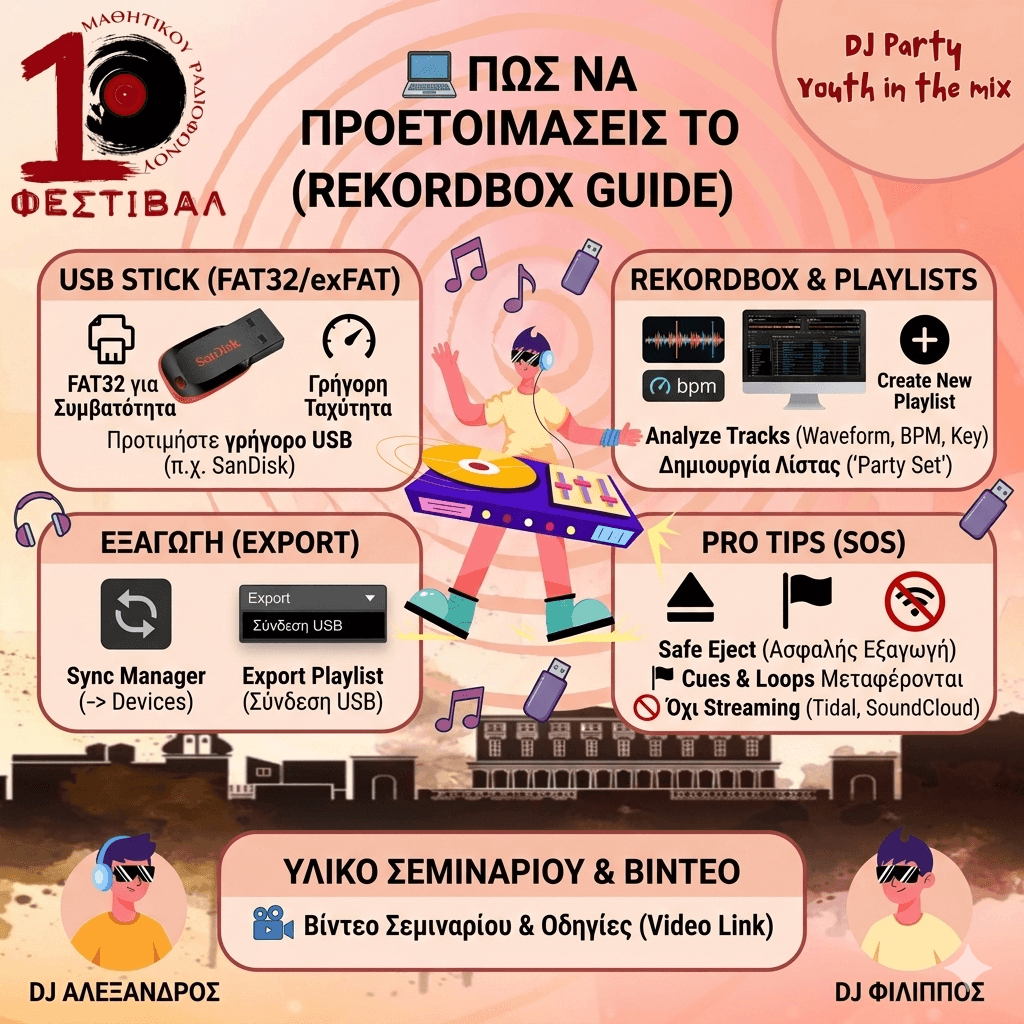
1. The USB Stick\</h4\> \
-
- \<li\> \
\Format:\</b\> It must be formatted as \FAT32\</b\> (for maximum compatibility) or \exFAT\</b\>.\</p\> \</li\> \<li\> \
\Quality:\</b\> Use a fast USB stick (e.g., SanDisk) to prevent waveforms from “freezing.”\</p\> \</li\> \</ul\> \
2. In Rekordbox\</h4\> \
-
- \<li\> \
\Analyze:\</b\> Drag your 10 songs into Rekordbox. Wait for it to analyze them (the waveform, BPM, and Key will appear).\</p\> \</li\> \<li\> \
\Playlist:\</b\> Right-click on “Playlists” -\> \Create New Playlist\</b\> (e.g., “My Festival Set”). Drag your tracks there.\</p\> \</li\> \</ul\> \
3. Transfer (Export)\</h4\> \
-
- \<li\> \
\Sync Manager:\</b\> Click on Sync Manager (bottom left), select your playlist, and click the arrow (\-\>\</b\>) pointing towards your USB.\</p\> \</li\> \<li\> \
\Alternative:\</b\> Right-click on your playlist -\> \Export Playlist\</b\> -\> Select your USB stick.\</p\> \</li\> \</ul\> \
\<em\>\<strong\>In the video below, there is a detailed demonstration of the process (you can enable Greek subtitles via automatic translation)\</strong\>\</em\>
\
\
\
💡 Pro Tips from Alexandros \& Filippos\</h2\> \
-
- \<li\> \
⚠️ \Eject:\</b\> Never pull out your USB stick abruptly\! Always \Eject\</b\> from within Rekordbox.\</p\> \</li\> \<li\> \
🚫 \Streaming:\</b\> Do not use songs from Tidal/SoundCloud. They must be \files saved\</b\> on your computer (MP3, WAV, etc.).\</p\> \</li\> \<li\> \
🎧 \Hot Cues:\</b\> If you set starting points (Cues) in Rekordbox, you will find them ready on the console\!\</p\> \</li\> \</ul\> \
If you get stuck anywhere, send us a message\! Prepare well and let’s make the 10th Festival unforgettable\!\</p\> \
\Keep on mixing\!\</b\> 🎧🔥\</p\>